

What is BIMI?
BIMI (Brand Indicators for Message Identification) is an email standard that lets you display your brand’s logo next to your emails in the recipient’s inbox. Instead of a generic avatar or initials, recipients see your actual logo — making your emails instantly recognizable.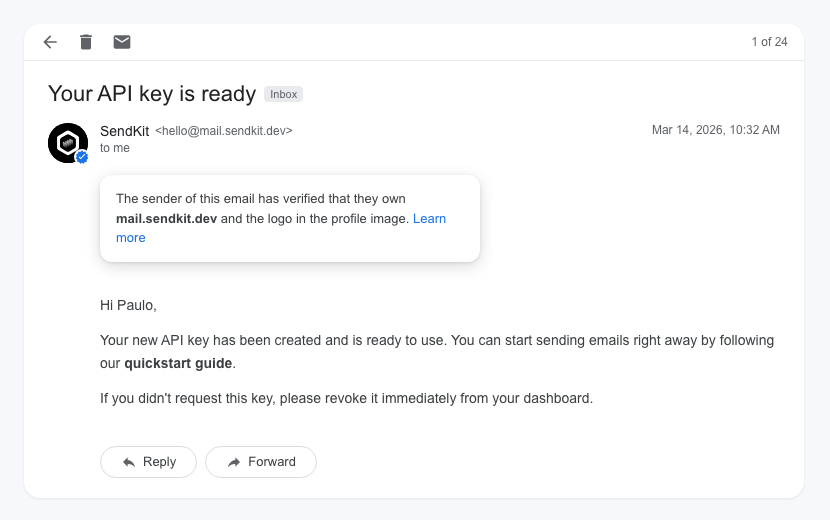
How BIMI works
BIMI builds on top of DMARC. Here’s the chain of trust:- SPF and DKIM authenticate the email
- DMARC enforces a policy (
quarantineorreject) on failing emails - BIMI tells the email client where to find your logo
- The email client verifies the DMARC policy is enforced, then displays the logo
Prerequisites
Before implementing BIMI, you need:- A verified domain in SendKit with SPF and DKIM passing
- A DMARC record with
p=quarantineorp=rejectatpct=100. See the DMARC guide - A logo in SVG Tiny PS format (more details below)
- A mark certificate (VMC or CMC) from a supported certificate authority
Email client support
Not all email clients support BIMI. Here’s the current support:| Email client | VMC (Verified Mark Certificate) | CMC (Common Mark Certificate) |
|---|---|---|
| Gmail | Yes | Yes |
| Apple Mail | Yes | Yes |
| Yahoo Mail | Yes | Yes |
| Outlook (new) | Coming soon | Coming soon |
VMC requires a registered trademark. CMC is an alternative for organizations without a trademark — it requires demonstrating at least one year of consistent logo use.
Implementing BIMI
Step 1: Enforce DMARC
Your DMARC record must havep=quarantine or p=reject with pct=100 (all emails). If you’re still on p=none, follow the DMARC guide to upgrade your policy first.
Step 2: Prepare your logo
Your logo must meet these requirements:- Format: SVG Tiny PS (Portable/Secure) — a specific subset of SVG
- Shape: Square aspect ratio
- Background: Solid, non-transparent background (the logo will be displayed in a circle or square depending on the email client)
- Size: Keep it under 32 KB
A regular SVG file won’t work. It must be specifically in the SVG Tiny PS format. Most certificate authorities provide tools to convert your logo.
https://acme.com/brand/logo.svg
Step 3: Obtain a mark certificate
A mark certificate proves that you own the logo. There are two types: VMC (Verified Mark Certificate) — requires a registered trademark with an intellectual property office recognized by the certificate authority. CMC (Common Mark Certificate) — for organizations without a registered trademark. Requires demonstrating at least one year of consistent, visible use of the logo. You can obtain certificates from:- DigiCert
- GlobalSign
- SSL.com
Step 4: Add the BIMI DNS record
Add a TXT record to your DNS:| Field | Value |
|---|---|
| Type | TXT |
| Name | default._bimi.yourdomain.com |
| Value | v=BIMI1; l=https://acme.com/brand/logo.svg; a=https://acme.com/brand/certificate.pem; |
| TTL | 3600 |
BIMI record parameters
| Parameter | Required | Description |
|---|---|---|
v | Yes | Version. Always BIMI1 |
l | Yes | URL to your logo in SVG Tiny PS format (must be HTTPS) |
a | Yes | URL to your VMC or CMC certificate in PEM format (must be HTTPS) |
Verifying your BIMI record
After adding the DNS record, it may take a few days for email clients to start displaying your logo. You can verify your setup by:- Sending a test email to a Gmail or Yahoo address
- Checking the email headers for
bimi=passin theAuthentication-Results - Looking for your logo next to the email in the inbox
Gmail may cache BIMI lookups. If your logo doesn’t appear immediately, wait 24–48 hours and try again.
FAQ
Is BIMI free?
Is BIMI free?
The DNS record is free. However, you need a mark certificate (VMC or CMC), which is a paid certificate from a certificate authority. Prices vary by provider.
Do I need a trademark for BIMI?
Do I need a trademark for BIMI?
Not necessarily. A VMC requires a registered trademark, but a CMC only requires one year of demonstrated logo use. The CMC option makes BIMI accessible to smaller organizations.
What happens if my DMARC policy is p=none?
What happens if my DMARC policy is p=none?
BIMI won’t work. Email clients require
p=quarantine or p=reject at pct=100 before they’ll display BIMI logos. This ensures that only properly authenticated senders can show their logo.Can I use different logos for different email types?
Can I use different logos for different email types?
BIMI supports selectors, so you could in theory use different logos. In practice, most organizations use a single
default selector with one logo for consistency.